As of 2016-02-26, there will be no more posts for this blog. s/blog/pba/
Showing posts with label login. Show all posts

I swore this got me scared for a bit.
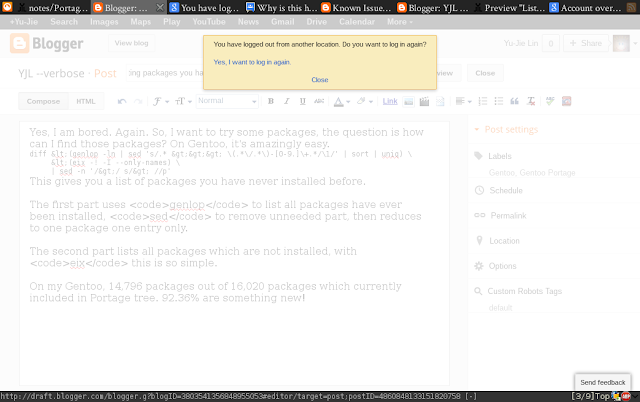

Just minutes ago, this showed up while I was writing a new post:

You have logged out from another location. Do you want to log in again?

Yes, I want to log in again.

Close

First thought to mind: Oh, no, have I just got hacked?

Question popped up right after: What should I do?

I went to check Google Accounts, but it doesn't show you account activity but a last sign-in time, which isn't useful. I was hoping I could get a list of IP and logging times like Gmail's. If I could have a list, I could determine if I get hacked easier.

Anyway, I googled that line as I should've already done. A thread brought me to a known issue, which isn't labeled as fixed yet. The last discussion in that thread was in September, two months later, I got the same message.

After re-logged in, everything seems fine. So, I am probably okay, it's just a glitch on Blogger.

As I said in my previous post, I added two sources: I Quotes and QDB.

Now the login screen looks even more interesting. Both sources provide API, so there was not much trouble to utilize both of them.

First one has already wrapped the text (I think it's 80 characters), which might not be suitable for every console since screen sizes vary. QDB provides a feed, simply use xmllint to get what I want as I did with That's What She Said.

I wasn't thinking QDB was possible to use, because the site I knew was http://www.bash.org/ not http://www.qdb.us/. I don't know what relation is between these two. Could be built by same person, but I am not sure and didn't look into it.

The problem with the first link is there is no API or feed to use, I had been thinking to have it on my computer, but there was no way except scraping that website, which I prefer not to do so.

I hope these two sources will also make you laugh when you are about to log in and start a day. :)

I am trying to parse passwd and group files for login names, so this brought me to think about what characters are valid, which I never thought about before and always assumed it's /[a-z]+/.

Here is the explanation from the manpages of useradd and groupadd:
Usernames must start with a lower case letter or an underscore, followed by lower case letters, digits,
underscores, or dashes. They can end with a dollar sign. In regular expression terms: [a-z_][a-z0-9_-]*[$]?

Usernames may only be up to 32 characters long.

Groupnames must start with a lower case letter or an underscore, followed by lower case letters, digits,
underscores, or dashes. They can end with a dollar sign. In regular expression terms: [a-z_][a-z0-9_-]*[$]?

They even provide ready-to-go regular expressions for matching, but does anyone know about the ending dollar sign?

I am guessing it must be some sort of history, but I am not that old to know about it and I have never seen any login username contains dollar sign in any OS I have ever used.

I tried to find an answer on Internet, but didn't see any page talked about this (why would one?). However, there are some results about Windows login with ending dollar sign.

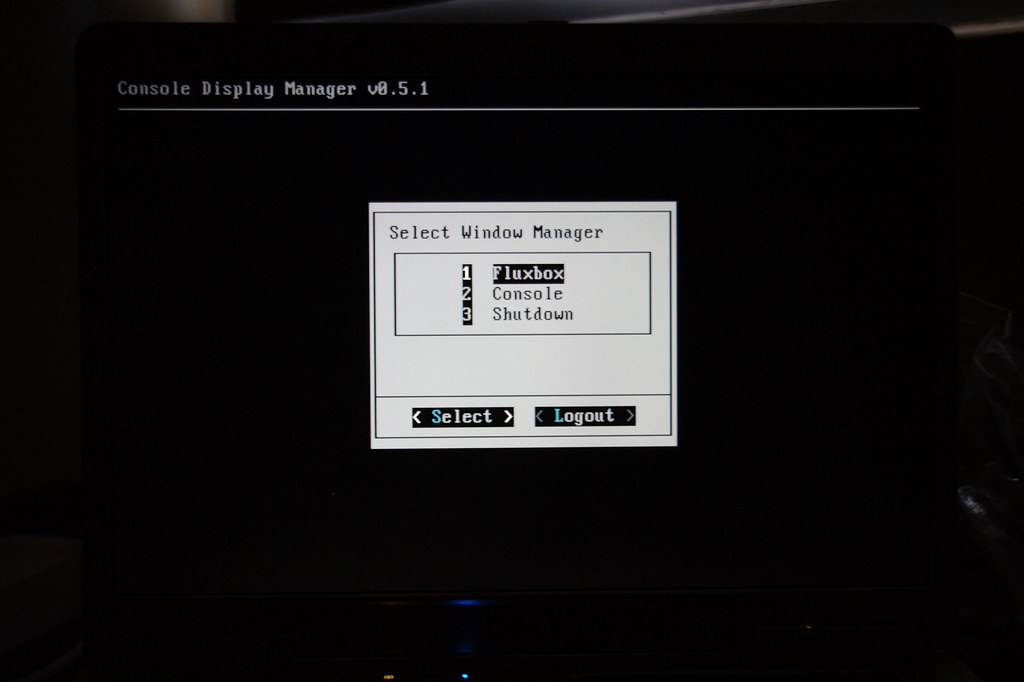
Console Display Manager is another great program I found on forums. I downloaded it from GitHub, the authors website seems to be down. Followed that wiki page to configure it, then deactivated XDM and rebooted. I logged in in console and the display manager showed up

https://farm5.staticflickr.com/4140/4926241632_14cb2f7af7_b.jpg

CDM works a little different than other DMs. You log in in console (tty1), then /etc/profile.d/zzz-cdm-profile.sh kicks in and you see the display manager. It checks if you are in console, then launches cdm and you choose DE/WM to continue. Basically, you dont need to manually run startx just press the enter key.

I use the default theme instead of cdm theme. You can try those themes (/usr/share/cdm/themes) just fire up cdm in your terminals, use escape key to quit. You dont have to log out only to see the theme. Honesty, the color schemes are not so good in console, thats the reason I chose default them. Its not fancy but still looks good.

The memory usage is slightly smaller, I believe if its written in C, it would use less. It is written in Bash. This was with XDM:

https://farm5.staticflickr.com/4141/4926241636_46101814d3_o.png

And this was with CDM:

https://farm5.staticflickr.com/4102/4926241640_63f50d1705_o.png

Its about 2-3 MB less but XDM had two more dbus programs running, so its probably 1-2 MB less.

The reason I used XDM was because I didnt want to type startx, now I have removed the XDM since I still dont need to with CDM. My Gentoo is slimmer a little bit.